Sunday, April 21, 2013

Little Trip To China (Time Lapse)

I had a trip to Guangzhou, China in this semester during Chinese new year, and I made a time lapse of the trip, called Little Trip To China, I recorded the trip from Kuala Lumpur airport all the way to China. It was a great trip, and I'm really glad that I had my camera with me and captured around 6000 images to combine them into a time lapse video, it is a travel log, hope you like it.

Research on Time-lapse Photography
Time-lapse photography is a technique whereby the frequency at which film frames are captured is much lower than that used to view the sequence.
When played at the normal speed, time appears to be moving faster and thus lapsing. The result is an apparent 30-times increase.
Process that would normally appear subtle to the human eye, e.g. the motion of the sun and stars in the sky, become very pronounced. Time lapse is the extreme version of the cinematography technique of under cranking, and can be confused with stop motion.
(Resource from Wikipedia)


I watched some of time-lapse video on Youtube, and got some inspirations from the videos I watched. such as this one, very typical. This video is called The Longest Way, a time-lapse of how his hair and beard grew during a ling trip in China. A very creative idea.

So then I decided to do a travel log with my time-lapse assignment.


After the trip, I got back to Malaysia with these more-than 6000 images, and tried to combine them into a video; at the beginning, I chose to use Premiere Adobe to combine the images into a time-lapse video, but I actually spent 1 week to combine the images in Premiere software, and I couldn't render everything in the end, so I chose to give up and try to find some other ways to make this video.

So I went on Youtube to find some Time-lapse tutorial videos and have a look at how other people make their time-lapse video; then I found this tutorial video. This guys used Light Room software to combine the images into a time-lapse video, then I gave a try, downloaded and installed Light Room on my PC, and successfully made my time-lapse video.

Light Room isn't a video editing program, it is an image editor, so after I rendered all the images into time-lapse video, I used Windows Live Movie Maker to add music and effect.

The reason why Premiere worked very slow on making time-lapse video is because the images' size are too big, and too many.


When I installed Light Room in my PC, I didn't start working with all the images I have first, I first started experimenting with the quarter of the images that I have, but at the first experiment, I didn't know that I had to install a template in Light Room program to make the frames move faster than the program gave to the video itself, so the first experiment looked like this in the video on the right side, and didn't really look like a time-lapse video, because the  frequency is really low.


So I downloaded the template as the tutorial video told, and installed the template in the Light Room program, so it looked like this. It is much faster than the last video.


After the experiment, I started working on all of the images and rendered all into a time lapse video without any music.


The video is done, so it's time to choose music and edit the video, I watched the video many times to choose right music for this time-lapse video, then I think Electro Swing type of music for the video, because electro swing music's got fast and happy beat, exactly in the theme that the video is. The video shows a really fast movement of different places and the journey is as fast as the time lapsed. So I picked 1 song called The Trumpet, Electro Swing genre. and added the titles and blog address in the beginning and the end of the video.

So this is one of my photography assignments in this semester, Time lapse; I managed to practice and learn the skills of making time-lapse, and met a lot of problems in the process, but I tried to manage with all the problems that I had. This is my first time working on time-lapse project, I know the video isn't the best, but I would try to make it better and better in the future.
Hope you like this travel log, Little Trip To China.


Saturday, April 20, 2013

Final Installation Art

"Memory" Installation has been updated, the previous installation was made randomly with the films and wires, so I thought to improve the artwork within grid system.
First of all, here are 2 videos of our installation art, one of  the video was recorded and edited with the theme we have-"Memory"  Enjoy.


Some pictures of the installation artwork


So, after all, I've got some feedback from different people about the previous installation artwork, such as, the artwork space is too small, and the artwork is too off-the grid. I agree that the previous work is off-the grid, so I decided to develop the work with designing the grid system first and plan everything before the practical work and connecting the films and wires randomly. 
So I gave myself a bit more challenge this time, I chose a location where's a bit dangerous but an obvious space to be seen.
Here's the sketch of the artwork's plan, so this time, I wanna create my own grid system in a cube a bit similar as the beginning idea, although this time the cube's created with wires instead of chopsticks, and bigger; a cube has 6 sides and 12 lines connected, so I designed different grid layout on each 2 sides, and each 2 sides are the same layout as the reflection of a mirror, there are front and back sides, left and right sides, top and bottom sides(as the second page on the right)
For making the cube, I needed 12 same length wires, so each wire is 80cm; the stripes to create the layout on the sides are going to be  films in wires, 2 stripes on each side. And we are going to create an inbox grid system by cross connecting 2 stripes on each front&back, left&right and top&bottom, so we need 18 more same-length wires(with films on the wires)


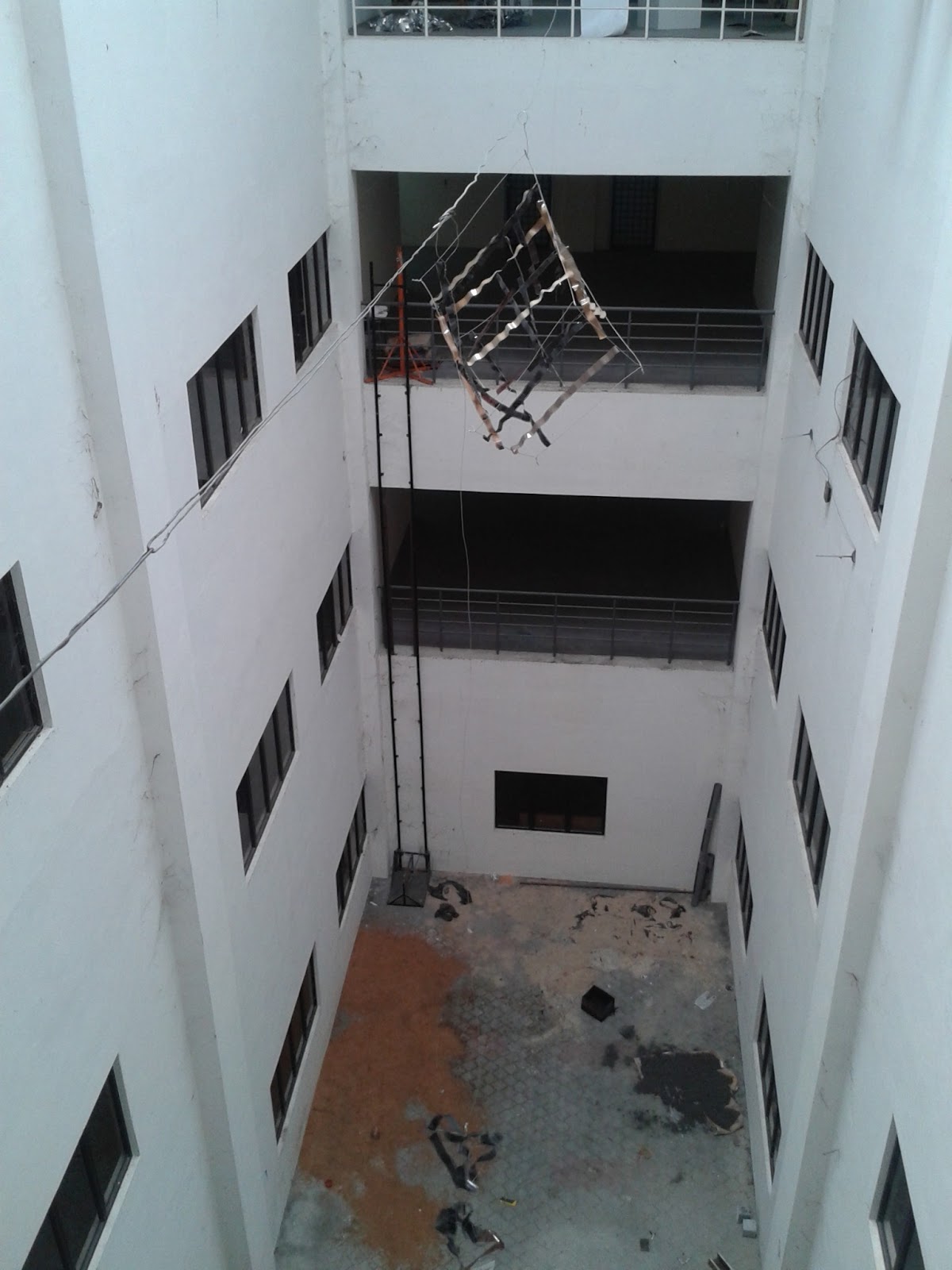
Here's a sketch of the installation art space, I picked the atrium to hang the installation art, it's got 4 levels with the ground floor, so the work will be in the middle of the atrium with a long thick wire, and it will be on the top level; it is a very challenging space, the distance between is very long, and the solutions of hanging the artwork were a few, 1 tie a long string on the wire and tie a bottle of water or something heavy on the other side of the string and throw the object all the way cross, 2 get more people's help to drag the wire through the windows on the side. So I chose the second solution, because it's safer than the first, throwing a bottle all the way cross isn't gonna be definitely successful; but actually during the practical work, we used both solution, because one of the studio was locked and we couldn't use the window, and the wire was stuck in the middle way, so we used the first solution to throw a bottle of water all the way to the other side.


Then after all the sketching and planning, I thought it'd be better to make a mock-up as a beginning to see what is looks like, and then try to improve more on the sketches and plans, so it'd be perfectly planned.


I created a small cube with the thin wires and tapes as the films in the grid layout on each 6 side.


Got pretty satisfied with the mock-up, then it's time to start the practical work.
Here they are, 12 wires 80cm wires to create a cube

18 more wires to add films with for the grid layout throughout the cube


The finished cube with12 wires


Films in wires


Time to install the film striped in the cube, half way done


Done, time to hang the cube!


So I hung the cube in the middle of the atrium with lots of people's help, and there it is, and there are 2 small parts from the previous "Memory" installation on the sides next to the cube.


But after all, I still think the installation needs a bit more development by making the cube more stable and look more of a cube, and the 2 small parts on the sides next to the cube don't look like they are together, because the distance between them are too far, so I decided to try to get the cube back and more more wires in the cube to make it more stable, and hang the 2 small parts together on the cube, although it was really hard to get the cube back, we connected 2 broom sticks with tapes and stuck a wire hook on one side and dragged the cube back carefully.
One wire has been installed 

The second one has been installed 

the wires are connected by a ling thin wire

Added the third one to make the cube the stablest.


Finished up, time to hang it.

So this is the final installation art- Memory in Grid system, hope you like it.


Friday, April 19, 2013

"Memory" Installation

So, my team mate and I gave our installation a theme, called Memory, films are part of memory cause they document the past moments.
Memory could be blurry, that some people don't remember something from the past sometimes, memory could be happy, like a certain part of the past time which made you exited or feel good, memory could be sad as well, such as when some people or pets around you pass away, or some unbelievable accident and natural disaster.
Well, now let's have a look at the installation art.
Here's a gif file, it's the movement of the artwork's shadow.

And here's a video how the entire artwork moves. 


We added lighting for the installation art to reflect the shadow of the installation art. and we cut some words stencils and hung on the artwork, so the shadow of the words are on the wall as well. The words are a few words which represent the term "memory, such as love, the love people had must have been happy memory.

Here's our infographic of our "Memory" research, process and explanation on the wall next to the installation art.

And with the Memory theme, I added music for the installation art as well, it's a whole album called New Time by The Dreamer. Very nice, slow and appropriate music for the theme, here's a video of the artwork with the music played at the background. Enjoy.


As I understand grid system, it is a guideline of designing and it helps designing better and easier. Well the task was to create our own grid system, so I found grid system in the films, each image in the negatives is grid, then I chose to use film as as element to experiment, and I picked wires as elements as well to connect the films.

so for an experiment, my team mates and I started to put the films together and connect them randomly into our own style.


Then we cut the words stencils for hanging on the artwork.


After all, I combined our work together with the stencils.

So now it's time to hang our work


Hanging our infographic on the wall

Setting up the lighting


After being hardworking, we finally adjusted everything.


So it is "memory" installation art, hope you like it.